Follow the instructions below if an Ethernet Signal Repeater triggers one of the following alarms:
-
Signal repeater AC power failure
-
Signal repeater standby battery low
-
Signal repeater offline
Please contact us if your Ethernet Signal Repeater went offline after your network speed was upgraded.
-
Locate the signal repeater on site.
-
Ensure that the:
-
Power cable is securely connected to the bottom of the signal repeater and the wall socket
-
Ethernet cable is securely connected to the bottom of the signal repeater and the network switch
-
-
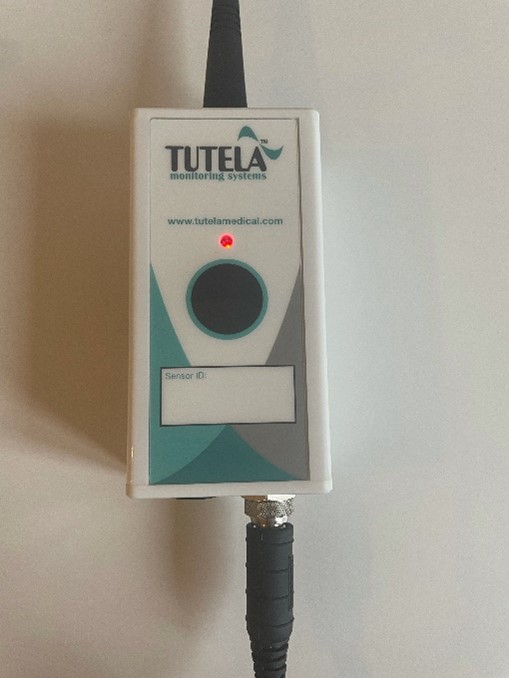
Check the signal repeater LED (see image 1) If it is:
-
Solid green, you have resolved the issue
-
Flashing red, continue with step 5.
-
Solid amber/not lit, try another power socket. If the LED still does not illuminate:
-
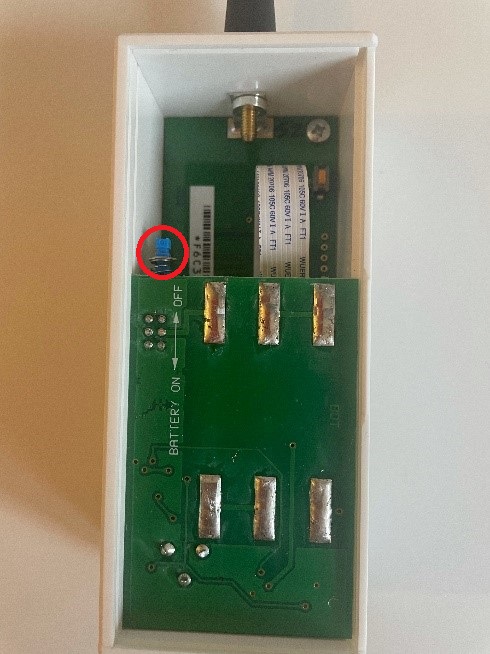
Remove the power supply cable and open the back of the signal repeater (see image 4).
-
Press the blue button (as highlighted in image 2).
-
Wait 30 seconds then press the blue button again.
-
Reattach the backplate.
-
Return the signal repeater to its original position.
-
Reconnect the power supply cable. If the LED is:
-
Solid green, you have resolved the issue
-
Flashing red, continue to step 4.
-
Solid amber/still not lit, please contact us.
-
-
-
-
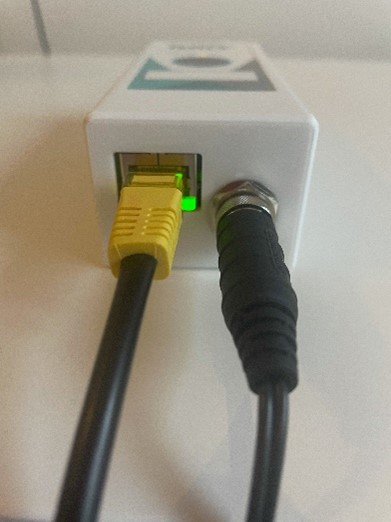
Check the Ethernet connection LED (see image 3) on the bottom of the signal repeater. If it is:
-
Green, continue to step 5.
-
Not lit, replace the Ethernet cable. After that, if the Ethernet LED is:
-
Green, continue to step 5
-
Still not lit, please contact your site IT team to request they investigate the connectivity
-
-
-
Check the signal repeater LED again (see image 3) If it is:
-
Green, you have resolved the issue
-
Red, please contact us.
-