
Overview
The Gigabit Ethernet Repeater relays data from sensors to the WARP if there is poor signal due to distance or obstructing items.
It receives data from sensors wirelessly and sends them to the WARP via an Ethernet cable which connects to a network switch.
It supports both standard and gigabit network speeds.
It should always be connected to:
-
A network switch using an Ethernet cable for data transmission
-
A power outlet using the power adapter (unless your network switch supports Power over Ethernet (PoE)
Do not connect the power adapter if you use Power over Ethernet (PoE).
It contains a backup battery with a 6-hour duration in case of interruption to the power supply.
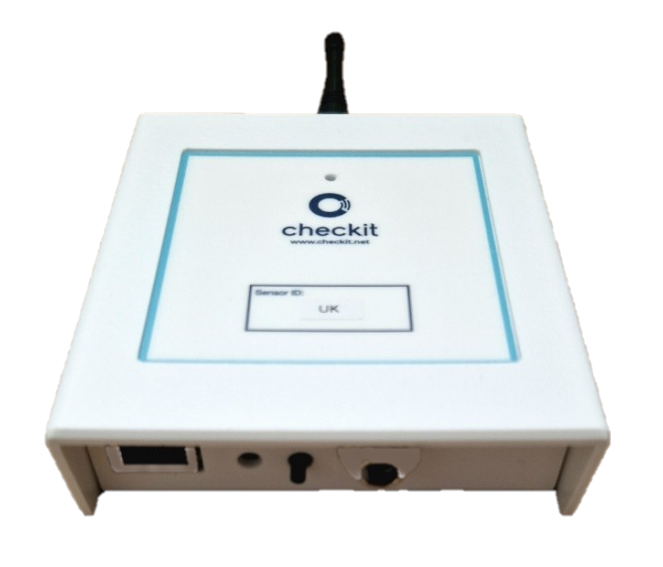
Description
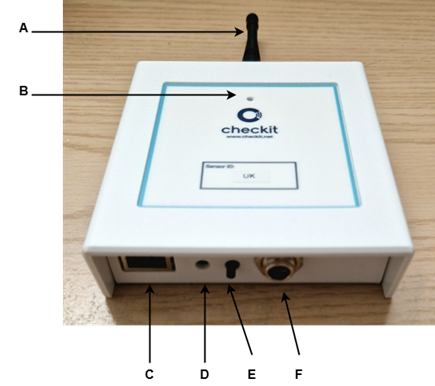
A. Antenna
B. Status LED:
-
Solid green - connected to the WARP
-
Green & amber flashing - connecting to the WARP
-
Solid amber - running on backup battery supply (see Signal Repeater Troubleshooting)
-
Flashing red - not connected to the WARP (see Signal Repeater Troubleshooting)
-
No LED - powered off (see Signal Repeater Troubleshooting)
C. Ethernet port
D. Factory reset button
E. Transmit now button: Press and release to immediately send data to the WARP
F. 12V power supply input
Safety Precautions and Warnings
-
Use either the power adapter or Power over Ethernet (PoE), but not both at the same time. Connecting both power sources simultaneously may damage the device.
-
Only use the provided 12V power adapter. Using an unapproved adapter may cause damage or pose a safety risk.
-
For indoor use only. Do not use the power adapter or device in wet or damp environments.
-
Do not expose the device to water or moisture. This product is not water-resistant and may malfunction if exposed to liquids.
-
Operate only within the specified temperature range (0 – 45°C) to prevent damage or performance degradation.
-
Do not attempt to disassemble or modify the device. This may result in electric shock, fire, or voiding of certifications (CE, UKCA, FCC).
-
Ensure adequate ventilation around the device to prevent overheating. Do not cover or place inside enclosed spaces.
-
Do not use the device if the power cable or adapter is damaged. If you notice fraying, wear, or other damage, stop using it immediately and replace it.
-
This device includes a rechargeable Li-Ion backup battery (3.6V, 3350mAh). Do not replace it with a non-approved battery.
-
Do not puncture, crush, or expose the battery to fire—this can cause explosions or chemical leaks.
-
Charge the battery only through the device’s built-in charging system. Using third-party chargers may cause overheating or fire.
-
If the battery shows signs of swelling, leakage, or overheating, discontinue use immediately and contact Customer Support.
Technical Specification
|
Model number: |
EU/UK variant: GENII/SRPT/100G US variant: GENII/SRPT/200G |
|
Power source |
12V DC |
|
Battery backup |
Rechargeable Li-Ion 3.6V, 3350mAh |
|
Universal mains power requirements |
Standard 3-pin plug (UK), 2-pin plug (EU/US) |
|
Indication type |
LED |
|
Casing dimensions |
108 x 98 x 31mm |
|
Casing material |
ABS |
|
Weight |
230g |
|
Water resistance |
None |
|
Certifications |
CE, UKCA, FCC |
|
Ambient operating temperature range |
0 – 45 °C |
|
On-board memory |
N/A |
|
Ethernet data speed |
100 and 1000 Base-T standard |
|
Mi-Wi Wireless protocol |
EU 686MHz, Radiated power = +9dBm US 915MHz, Radiated power = +1dBm Occupied channel width: 153.6 kHz |
|
Software update mode |
Via Ethernet port or ICSP |