Product: Connected Workflow Management
Version: Android App Version 4.4
Release Date: from
Available on:
-
Ulefone
-
Motorola G75
-
Play Store
Downtime
This release will not cause any downtime.
User Impact
None
How to Get the Update
You will receive a notification on your mobile device when a new version is available to download. Tap the notification to download the latest version. Your device will restart during this process.
Alternatively, you can manually check for and download updates. Click here for instructions.
For instructions on how to check which version of the app a device is running, see About App screen.
Improvements
-
NFC Tags now available on Motorola G75 & Ulefone If you use our Checkpointsfeature, staff can now tap NFC tags on their Motorola G75 or Ulefone devices to instantly launch the assigned checklist.
-
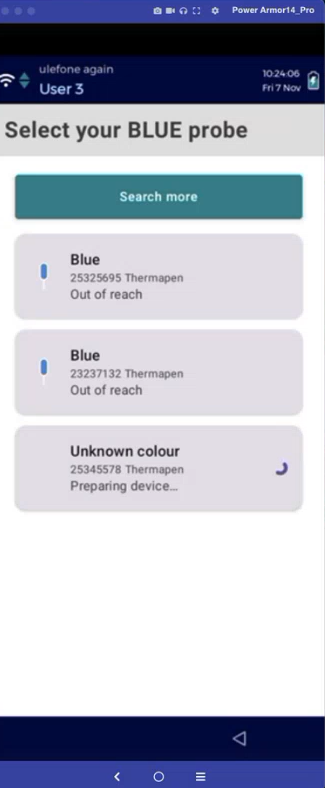
Improved ETI probe connection process
-
When completing a temperature check with an ETI probe, you now select which probe you want to pair with your mobile device (see image 1).
-
You can now take a temperature reading as soon as the probe successfully pairs with your mobile device. Previously, you had to wait 10 seconds.
-
ETI Infra Red Probes can now be used only on temperature checks where no probe colour is specified. This allows you to control when they are used. For example, if you want to restrict use to delivery temperature checks only, you can configure those checks with a non-specified colour and configure all other temperature checks to use a red or blue probe.
-
-
Receive Alert Notifications While Logged in to the App If you use our Mobile Alerting feature, you will now hear a sound notification while logged into the app if an alert occurs. Previously, you only received notifications when logged out.
-
Work Download on Auto Logout The app now downloads any new work when a user is automatically logged out due to inactivity. Previously, the app only downloaded new work when a user manually logged out.
-
Technical platform upgrades
The app now targets a newer Android SDK version, supports modern device requirements (like 16 KB page sizes), and updates many internal libraries. These changes improve compatibility, performance, and long-term maintainability. -
QR code scanning performance
The app now always uses a built-in machine-learning model to scan QR codes, instead of depending on the device. This makes scanning quicker and more consistent across all phones. -
Telemetry and diagnostics
The app now sends clearer technical signals about how it’s performing. This helps identify issues faster and improves overall stability.
Fixes
-
Fix for late delivery of sensor and service alerts on mobile devices
If you use our Mobile Alerting feature, you’ll now receive sensor and service alerts on your mobile device as soon as they occur. This fixes an issue where alerts weren’t appearing right away. -
Fix for Real-Time Collaboration not syncing across devices
If you use Real-Time Collaboration, checklists now sync correctly across devices at the same location. This fixes an issue where updates made on one device were not appearing on other devices, preventing teams from seeing live progress or continuing checklists started by others. -
Fixes for crashes seen on newer Android versions
Several crashes that happened shortly after launching the app—especially on Android 13 and above—have been resolved. -
Memory leak fixes
Many issues that caused the app to slowly use more memory than it should have are now fixed, making the app smoother over long periods of use.